
Broadcasting#
Broadcasting is a mechanism which allows tensors with different
numbers of dimensions, or with axes of length 1, to be combined
in elementwise operations by (virtually) replicating the smaller
tensor along the dimensions that it is lacking.
It is what lets you add a scalar to a matrix, a vector to a matrix, or a column to a row, without having to manually tile either operand.
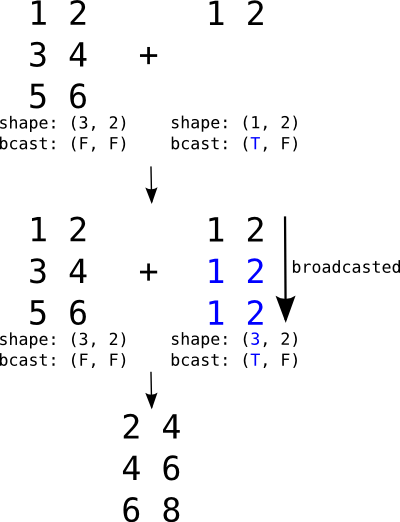
Broadcasting a (1, 2) row against a (3, 2) matrix. The
row is virtually replicated along axis 0 to match the matrix.
The figure uses the legacy bcast: (T, F) notation: T
marks an axis statically known to be length 1 (broadcastable)
and F an axis whose length is unconstrained.#
If the second argument were a vector instead of a row, its shape
would be (2,). It would be automatically expanded to the
left to match the rank of the matrix (adding 1 to the
shape), resulting in (1, 2), and then broadcast just like the
row in the figure.
Unlike NumPy, which does broadcasting dynamically, PyTensor needs
to know, at graph-build time, which dimensions of an input may be
broadcasted. A dimension can only be broadcasted against another if
PyTensor knows statically that its length is 1. This information
lives on the variable’s type.shape:
a concrete integer (such as 1) means PyTensor knows the size,
and None means the size is only known at runtime.
The following code illustrates how a column variable is broadcasted in order to be added to a matrix (broadcasting on the trailing axis):
>>> import numpy as np
>>> import pytensor
>>> import pytensor.tensor as pt
>>> x_matrix = pt.matrix("x_matrix")
>>> x_matrix.type.shape
(None, None)
>>> y_col = pt.col("y_col")
>>> y_col.type.shape
(None, 1)
>>> out = x_matrix + y_col
>>> fn = pytensor.function([x_matrix, y_col], out)
>>> X = np.arange(9).reshape(3, 3)
>>> Y = np.arange(3).reshape(3, 1)
>>> fn(X, Y)
array([[ 0.,  1.,  2.],
       [ 4.,  5.,  6.],
       [ 8.,  9., 10.]])
The column’s trailing axis is statically known to be 1, which is
why PyTensor is willing to broadcast it against the matrix.
Runtime broadcasting limitations#
Warning
PyTensor does not broadcast dimensions whose length is only
known to be 1 at runtime. A graph that would broadcast fine
in NumPy can raise a ValueError when executed. To get
broadcasting, the length-1 axis must be visible in the
variable’s static type.shape.
For example, adding a matrix to another matrix whose trailing axis
happens to be 1 at runtime fails:
>>> x_matrix = pt.matrix("x_matrix")
>>> y_matrix = pt.matrix("y_matrix")
>>> out = x_matrix + y_matrix
>>> fn = pytensor.function([x_matrix, y_matrix], out)
>>> try:
...     fn(np.zeros((3, 3)), np.zeros((3, 1)))
... except ValueError as err:
...     print(str(err).split("\n")[0])
Incompatible vectorized shapes for input 1 and axis 1. ...
Note that runtime length 1 is only a problem when paired with a
non-1 length on the other side, where broadcasting would be
required. Calling the same fn with matching shapes works fine,
because no broadcasting needs to happen:
>>> fn(np.zeros((3, 3)), np.zeros((3, 3))).shape
(3, 3)
>>> fn(np.zeros((3, 1)), np.zeros((3, 1))).shape
(3, 1)
PyTensor assumes generality by default: a dimension declared with
None is treated as “any length”, not as “possibly 1”. To
allow broadcasting you have to make the length-1 axis visible
to the graph. There are three idiomatic ways to do this.
Declare the static shape on the input. If you know an input will always have length
1along an axis, say so when you create it:>>> x_matrix = pt.matrix("x_matrix") >>> y_col = pt.matrix("y_col", shape=(None, 1)) >>> out = x_matrix + y_col >>> fn = pytensor.function([x_matrix, y_col], out) >>> fn(np.zeros((3, 3)), np.zeros((3, 1))) array([[0., 0., 0.], [0., 0., 0.], [0., 0., 0.]])
Use
specify_shapeinside the graph. When the variable comes from somewhere you do not control (for example an intermediate result), you can pin its shape:>>> x_matrix = pt.matrix("x_matrix") >>> y_matrix = pt.matrix("y_matrix") >>> y_col = pt.specify_shape(y_matrix, (None, 1)) >>> out = x_matrix + y_col >>> fn = pytensor.function([x_matrix, y_matrix], out) >>> fn(np.zeros((3, 3)), np.zeros((3, 1))) array([[0., 0., 0.], [0., 0., 0.], [0., 0., 0.]])
Drop the axis and add it back explicitly. If the variable is conceptually a vector that you only happened to wrap in a length-
1trailing axis, model it as a vector and broadcast withexpand_dims:>>> x_matrix = pt.matrix("x_matrix") >>> y_vector = pt.vector("y_vector") >>> out = x_matrix + pt.expand_dims(y_vector, 1) # or x_matrix + y_vector[:, None] >>> fn = pytensor.function([x_matrix, y_vector], out) >>> fn(np.zeros((3, 3)), np.zeros(3)) array([[0., 0., 0.], [0., 0., 0.], [0., 0., 0.]])
The same caveat applies to shape-producing operations that accept
symbolic shapes, such as full,
zeros, ones,
or alloc. Passing a symbolic length
yields None in the static shape, even if at runtime the length
will always be 1:
>>> n = pt.scalar("n", dtype="int64")
>>> pt.full((n,), 0.0).type.shape
(None,)
>>> pt.full((1,), 0.0).type.shape
(1,)
If you need the result to broadcast, use a literal 1 (or wrap
the result in specify_shape) so the static shape carries that
information.
Constants, on the other hand, always carry their full static shape and are safe to broadcast — PyTensor reads the shape directly from the underlying value:
>>> pt.constant(np.zeros((3, 1))).type.shape
(3, 1)
Shared variables, unlike constants, are assumed to be resizable.
By default their static shape is None along every axis, even if
the initial value happens to have a length-1 axis. Pass
shape= to mark the axes you want to be broadcastable:
>>> value = np.zeros((3, 1))
>>> pytensor.shared(value).type.shape
(None, None)
>>> pytensor.shared(value, shape=(None, 1)).type.shape
(None, 1)
Pinning the shape also tells PyTensor that future set_value calls
must respect it, so only do so for axes that genuinely will not change.
See also: