
More Examples#
At this point it would be wise to begin familiarizing yourself more systematically with PyTensor’s fundamental objects and operations by browsing this section of the library: Basic Tensor Functionality.
As the tutorial unfolds, you should also gradually acquaint yourself with the other relevant areas of the library and with the relevant subjects of the documentation entrance page.
Logistic Function#
Here’s another straightforward example, though a bit more elaborate than adding two numbers together. Let’s say that you want to compute the logistic curve, which is given by:
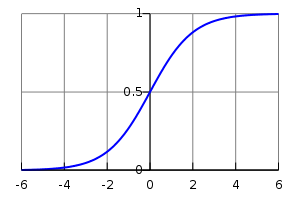
A plot of the logistic function, with \(x\) on the x-axis and \(s(x)\) on the y-axis.#
You want to compute the function element-wise on matrices of doubles, which means that you want to apply this function to each individual element of the matrix.
Well, what you do is this:
>>> import pytensor
>>> import pytensor.tensor as pt
>>> x = pt.dmatrix('x')
>>> s = 1 / (1 + pt.exp(-x))
>>> logistic = pytensor.function([x], s)
>>> logistic([[0, 1], [-1, -2]])
array([[0.5       , 0.73105858],
       [0.26894142, 0.11920292]])
The reason the logistic is applied element-wise is because all of its operations–division, addition, exponentiation, and division–are themselves element-wise operations.
It is also the case that:
We can verify that this alternate form produces the same values:
>>> s2 = (1 + pt.tanh(x / 2)) / 2
>>> logistic2 = pytensor.function([x], s2)
>>> logistic2([[0, 1], [-1, -2]])
array([[0.5       , 0.73105858],
       [0.26894142, 0.11920292]])
Computing More than one Thing at the Same Time#
PyTensor supports functions with multiple outputs. For example, we can
compute the element-wise difference, absolute difference, and
squared difference between two matrices a and b at the same time:
>>> a, b = pt.dmatrices('a', 'b')
>>> diff = a - b
>>> abs_diff = abs(diff)
>>> diff_squared = diff**2
>>> f = pytensor.function([a, b], [diff, abs_diff, diff_squared])
Note
dmatrices produces as many outputs as names that you provide. It is a
shortcut for allocating symbolic variables that we will often use in the
tutorials.
When we use the function f, it returns the three variables (the printing
was reformatted for readability):
>>> f([[1, 1], [1, 1]], [[0, 1], [2, 3]])
[array([[ 1.,  0.],
       [-1., -2.]]), array([[1., 0.],
       [1., 2.]]), array([[1., 0.],
       [1., 4.]])]
Setting a Default Value for an Argument#
Let’s say you want to define a function that adds two numbers, except that if you only provide one number, the other input is assumed to be one. You can do it like this:
>>> from pytensor.compile.io import In
>>> from pytensor import function
>>> x, y = pt.dscalars('x', 'y')
>>> z = x + y
>>> f = function([x, In(y, value=1)], z)
>>> f(33)
array(34.)
>>> f(33, 2)
array(35.)
This makes use of the In class which allows
you to specify properties of your function’s parameters with greater detail. Here we
give a default value of 1 for y by creating a In instance with
its value field set to 1.
Inputs with default values must follow inputs without default values (like Python’s functions). There can be multiple inputs with default values. These parameters can be set positionally or by name, as in standard Python:
>>> x, y, w = pt.dscalars('x', 'y', 'w')
>>> z = (x + y) * w
>>> f = function([x, In(y, value=1), In(w, value=2, name='w_by_name')], z)
>>> f(33)
array(68.)
>>> f(33, 2)
array(70.)
>>> f(33, 0, 1)
array(33.)
>>> f(33, w_by_name=1)
array(34.)
>>> f(33, w_by_name=1, y=0)
array(33.)
Note
In does not know the name of the local variables y and w
that are passed as arguments. The symbolic variable objects have name
attributes (set by dscalars in the example above) and these are the
names of the keyword parameters in the functions that we build. This is
the mechanism at work in In(y, value=1). In the case of In(w,
value=2, name='w_by_name'). We override the symbolic variable’s name
attribute with a name to be used for this function.
You may like to see Function in the library for more detail.
Copying functions#
PyTensor functions can be copied, which can be useful for creating similar
functions but with different shared variables or updates. This is done using
the pytensor.compile.executor.Function.copy() method of Function objects.
The optimized graph of the original function is copied, so compilation only
needs to be performed once.
Let’s start from the accumulator defined above:
>>> import pytensor
>>> import pytensor.tensor as pt
>>> state = pytensor.shared(0)
>>> inc = pt.iscalar('inc')
>>> accumulator = pytensor.function([inc], state, updates=[(state, state+inc)])
We can use it to increment the state as usual:
>>> accumulator(10)
array(0)
>>> print(state.get_value())
10
We can use copy() to create a similar accumulator but with its own internal state
using the swap parameter, which is a dictionary of shared variables to exchange:
>>> new_state = pytensor.shared(0)
>>> new_accumulator = accumulator.copy(swap={state:new_state})
>>> new_accumulator(100)
array(0)
>>> print(new_state.get_value())
100
The state of the first function is left untouched:
>>> print(state.get_value())
10
We now create a copy with updates removed using the delete_updates
parameter, which is set to False by default:
>>> null_accumulator = accumulator.copy(delete_updates=True)
As expected, the shared state is no longer updated:
>>> null_accumulator(9000)
array(10)
>>> print(state.get_value())
10
Using Random Numbers#
Because in PyTensor you first express everything symbolically and afterwards compile this expression to get functions, using pseudo-random numbers is not as straightforward as it is in NumPy, though also not too complicated.
The API is documented in pytensor.tensor.random. For a more technical explanation of how PyTensor implements random variables see Pseudo random number generation in PyTensor.
Brief Example#
Here’s a brief example. We create a shared RNG, draw from two distributions, and compile a function with update rules so the RNG state advances between calls:
import numpy as np
import pytensor
import pytensor.tensor as pt

rng = pt.random.shared_rng(seed=123)
next_rng, rv_u = rng.uniform(0, 1, size=(2, 2))
final_rng, rv_n = next_rng.normal(0, 1, size=(2, 2))

f = pytensor.function([], [rv_u, rv_n], updates={rng: final_rng})
Here, rv_u represents a 2x2 matrix of draws from a uniform
distribution and rv_n a 2x2 matrix of draws from a normal distribution.
Note how we thread next_rng into the second draw to ensure each gets a different RNG state.
The updates dictionary tells the function to update the shared RNG with the
final state after each call, so subsequent calls produce different numbers.
Reseeding#
You can reseed a shared RNG by setting its value to a fresh generator or seed:
rng.set_value(np.random.default_rng(42))
# Or equivalently
rng.set_value(seed=42)
This resets the RNG state so subsequent calls to f()
will produce a new deterministic sequence.
Other Random Distributions#
There are many distributions available
as methods on RNG variables (e.g. rng.normal(), rng.uniform()).
A Real Example: Logistic Regression#
The preceding elements are featured in this more realistic example. It will be used repeatedly.
import numpy as np
import pytensor
import pytensor.tensor as pt


rng = np.random.default_rng(2882)

N = 400                                   # training sample size
feats = 784                               # number of input variables

# generate a dataset: D = (input_values, target_class)
D = (rng.standard_normal((N, feats)), rng.integers(size=N, low=0, high=2))
training_steps = 10000

# Declare PyTensor symbolic variables
x = pt.dmatrix("x")
y = pt.dvector("y")

# initialize the weight vector w randomly
#
# this and the following bias variable b
# are shared so they keep their values
# between training iterations (updates)
w = pytensor.shared(rng.standard_normal(feats), name="w")

# initialize the bias term
b = pytensor.shared(0., name="b")

print("Initial model:")
print(w.get_value())
print(b.get_value())

# Construct PyTensor expression graph
p_1 = 1 / (1 + pt.exp(-pt.dot(x, w) - b))       # Probability that target = 1
prediction = p_1 > 0.5                          # The prediction thresholded
xent = -y * pt.log(p_1) - (1-y) * pt.log(1-p_1) # Cross-entropy loss function
cost = xent.mean() + 0.01 * (w ** 2).sum()      # The cost to minimize
gw, gb = pt.grad(cost, [w, b])                  # Compute the gradient of the cost
                                                # w.r.t weight vector w and
                                                # bias term b (we shall
                                                # return to this in a
                                                # following section of this
                                                # tutorial)

# Compile
train = pytensor.function(
          inputs=[x,y],
          outputs=[prediction, xent],
          updates=((w, w - 0.1 * gw), (b, b - 0.1 * gb)))
predict = pytensor.function(inputs=[x], outputs=prediction)

# Train
for i in range(training_steps):
    pred, err = train(D[0], D[1])

print("Final model:")
print(w.get_value())
print(b.get_value())
print("target values for D:")
print(D[1])
print("prediction on D:")
print(predict(D[0]))